

Record Skype
More and more people choose Skype. That comes as no surprise, since Skype made a revolution in telephony. However Skype doesn’t have a built-in feature to save calls and video calls. So how to save a copy of important conversations? Absolutely you will need third-party software that seamlessly integrates into Skype. We recommend you a piece of software that's incredibly reliable for recording Skype calls with the highest possible quality.
With the newest version of Ondesoft Audio Recorder for Mac , which is the best Skype call recording software for Mac usrers, chats between you and your friends will be recorded to one complete file once either of you run Skype recorder.
Now free download and install trial version of the Ondesoft Audio Recorder on your Mac.


This is Ondesoft Audio Recorder - allows you to record Skype calls with the following features:
- Record the audio portion of any Skype call.
- Record all sounds to one complete file.
- Record with perfect recording quality.
- Share recordings in a variety of formats.
- Edit your recorded Skype calls as you like.
In one word, Ondesoft Skype Recorder makes it an easy task to record Skype chats. It's the perfect tool for daily Skype recording.
Add Skype to the recorder and click the red record button, then start a conversation via Skype.
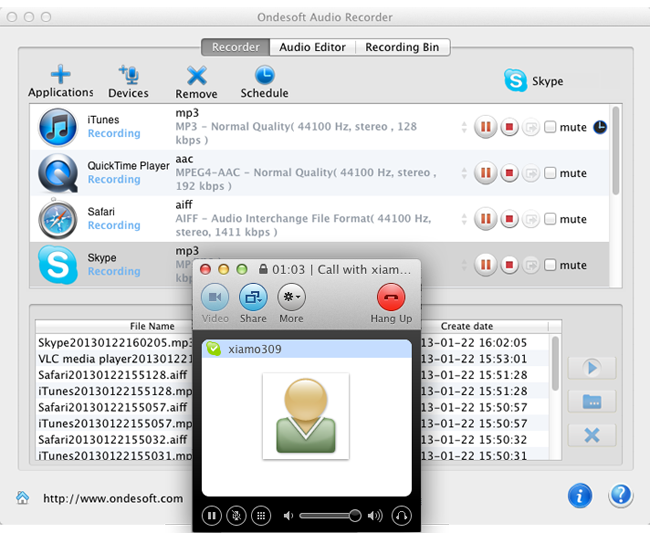
As soon as your conversation begins, Skype Recorder starts recording and save it into a variety of popular formats that you can play back later. It’s really handy! Download Skype Recorder now and see for yourself its huge capabilities at recording any calls via Skype.
Audio Recorder

Record any audio from any applications to MP3, M4A, etc. on Mac OS.