

How to record audio from YouTube?
YouTube is a video-sharing community, where people can upload, view and share videos with friends or families. When you watch those interesting videos, you may find some fair and original background music that you like. Is there any way to extract the audios from YouTube video and play them on your MP3 player? In my opinion, you can record audio from the videos with a YouTube recording tool - Ondesoft Audio Recorder . This YouTube audio recorder is currently the best and most powerful YouTube recording software, which allows you to record, extract audio from YouTube videos . What’s more, this YouTube Recorder can enable you to edit your recordings. You can cut off unwanted audio part or select multiple audio segments to generate into a new audio file.


Now let’s record fair music off YouTube videos to make background music for your own home movies:
Step 1: Install YouTube Audio Recorder on Mac
Free
download
and install trial version of YouTube audio recorder software on Mac (Period for free trial is 15 days). After installation, a desktop icon will be created for later quick launch. Now, open Music recorder on Mac.
Step 2: Record Audio from YouTube videos
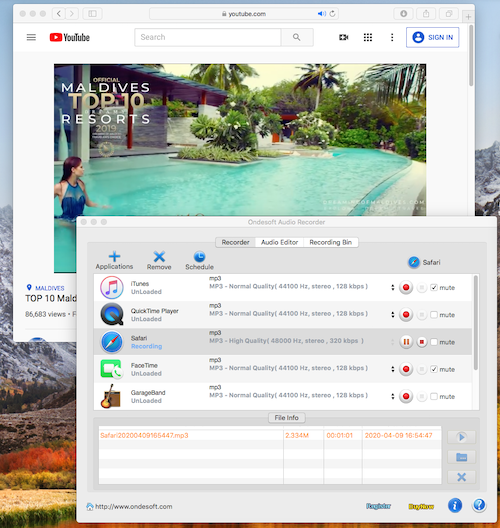
Add web browser you are using as recording source. The web browser can be Safari, Google Chrome or Firefox and etc. and hit "Record" button. Now go to
YouTube
, find and play the music or videos you would like to download. Until now, the YouTube Recorder is working now. As a smart audio recorder, it can always ensure users can get continuous audio file even though the YouTube video can't play smoothly. The recording program will record or pause automatically and synchronously as YouTube videos play or stop.
Step 3: Edit Recordings to personalize home-movie sharing (optional)
If you wan to edit and personalize the recordings to apply them into your home movie and share them on YouTube, this audio recorder is the right choice for you. You can remove off or prelude audio or generate a new audio including all your favorite audio clips.
Only two steps you can record audio from YouTube videos. So easy, right? Now, let's start to make our own home videos to share them on YouTube.
Audio Recorder

Record any audio from any applications to MP3, M4A, etc. on Mac OS.