

Record from Safari music to mp3 with Ondesoft Audio Recorder
Every time you surf the Internet, you may run into some songs you like very much. The best way to save these beautiful songs for free is by recording them to the designated output. It's no secret that Ondesoft Audio Recorder is probably one of the best applications you choose.
Ondesoft Audio Recorder for Mac
allows you to record any online streaming music from Safari.
Now free download and install trial version of the
Ondesoft Audio Recorder
on your Mac.
 Download
 Buynow
Interface
Ondesoft Audio Recorder has a standard OS X user interface that will not distract you in any way. There are three windows to help you manage different tasks: record from applications, record from device and audio editing window. When you want to record from
Safari
, you should choose the “Application” window.
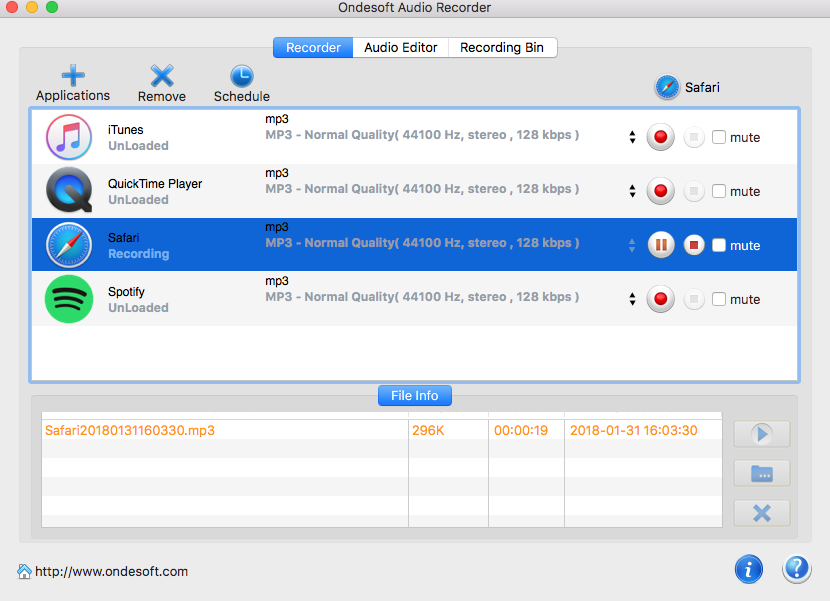
In addition, the “Application” window is divided into two parts, the upper part is for you to add applications, choose the output format, and control the recording process. When record sounds from Safari, you should add Safari as source first. Ondesoft Audio Recorder supports aac, ac3, aiff, au, flac, m4a, m4r, mka, mp3, ogg as output format. Also provides “Mute” function so you can enjoy other music without interruption while recoding is going.
The second part will show you detailed information of each recording and recorded file, including file name, size, duration, and create. All these are generated automatically when the recording begins. The default filename contains source, time, and format. For example, you begin recording a Mp3 file from Safari at 11:36:04 on Jun 26, 2012, the filename will be Safari20120626113604.mp3. Click “play”button to enjoy the recorded file or “reveal” to find the file quickly.
Record
Recording from Safari with Ondesoft Audio Recorder is really simple: first add Safari as the source, then click the red button to initiate Safari if you haven’t run it, or you may be asked to quit and relaunch if Safari is already running. Then go to Safari and play any sounds you want to record. Once there are sounds on your Mac, Ondesoft Audio Recorder will record them immediately with no quality loss. You may choose to pause or stop any time. Or when the sounds on Safari stops, Ondesoft Audio Recorder will stop recording immediately. If you wish to dispatch some useless files, you can simply select them and press the “delete” button.
Another highlight of the application is the edit feature. Ondesoft Audio Recorder allows you to cut all the fat, leaving you with exactly what you want.
Ondesoft Audio Recorder is one of the most feature-rich applications of its kind. Not only does it allow you to record any sounds from Safari so you can enjoy them anywhere, but it also gives you the chance to cut and merge your recorded files to get the best parts you need.
Audio Recorder

Record any audio from any applications to MP3, M4A, etc. on Mac OS.